⚡ One-time payment·Instant download · Updates in your account·MacOS & Windows Rocka Records ↗

// LIVE VISUALS FOR YOUR MUSIC

Your music sounds insane.
Make it look insane.

Rocka's WaveLab turns any audio into light, in real time. For your stream, your show, your projector or your socials. No coding, no editing.

  • 1 payment, no subscription
  • Instant download
  • MacOS & Windows

// THE PROBLEM

Your music deserves more than a flat line.

A generic visualizer, a still cover, a stream with the camera off. Meanwhile, your track sounds incredible. With WaveLab, every hit, every bassline and every vocal turns into light.

LIVE
∞combinations of modes, FX and color
LIVEreacts to your music instantly
YOUR COLORpalettes, glow and analog optics
ONE PAYMENTno subscription

// TRY IT RIGHT HERE

Endless ways to see your sound. One click between each one.

Tap a mode and mix it with FX, colors and backgrounds. What you see is the real output of the WaveLab engine, not an animation made separately.

Rocka's WaveLab — Rocka's Main Scene
MONITOR
The stereo image of your mix, drawn as a figure of light.
FX: NeutralFuriaWobbleEuforiaVHS rotoMonitor CRTHorizonte neónRetroTic-tac

// WHAT MAKES IT DIFFERENT

It's not just another visualizer.
It's your light show.

ANALOG LIGHT BEAM

The glow of a real oscilloscope. In any color you want.

Vector trace with phosphor persistence, glow and analog optics. Green is our signature, but you choose: magenta, amber, cyan or full RGB palettes.
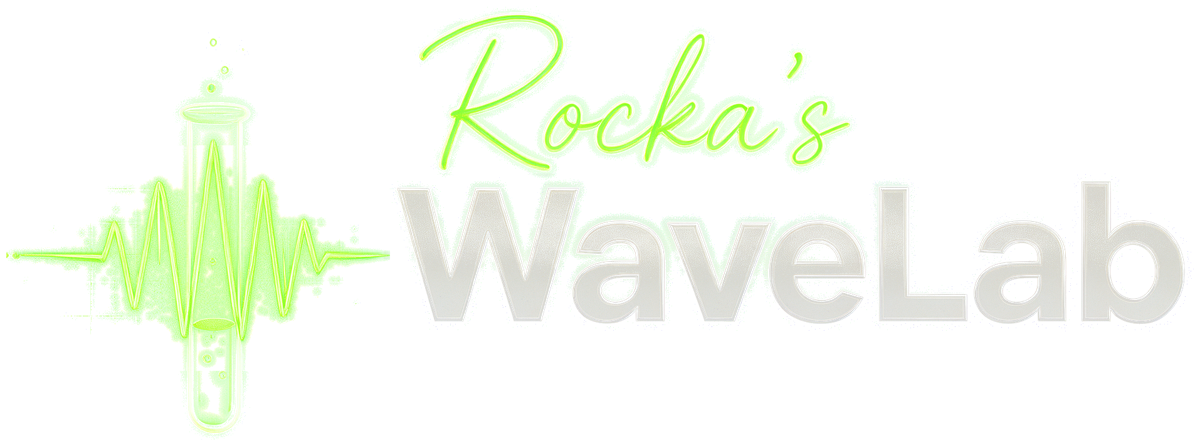
WaveLab's Projection Mapping editor with three surfaces

GOT A PROJECTOR?

Projection mapping on any surface.

Draw surfaces, adjust their corners and give each face its own visual. Calibrate, hit Go Live and your music is projected onto boxes, walls or stages. With Blackout to cut it instantly.

↖ Above: a real box projected with WaveLab.

AUTO SHOW + TRANSITIONS

Hit play and let WaveLab run the show.

Auto Show switches elements, colors and motion following the rhythm of your music (or your TAP). The engine's transitions link every change. You focus on playing.

WaveLab · Output
OBS · WINDOW CAPTURE

DO YOU STREAM?

A clean window, ready for OBS.

Open output gives you just the visual, no menus, to capture in OBS or send to a projector or a screen. Perfect for Twitch, YouTube, Kick or your live session.

● REC ✓ Video saved · MP4

DO YOU POST CONTENT?

Record your visualizer and post it today.

Hit Record, play with the modes and hit Stop: you get an MP4 with your audio, in 16:9 or square, up to 1920 px. Plus PNG captures for covers and posts.

Everything above, in a single app.

// EVERYTHING IT DOES

Every feature, in one line.

GoniometerYour stereo image turned into a figure of light.
WaveformYour audio's waveform, live and in full color.
ScopeA classic oscilloscope with an analog trace.
FigureYour images or videos, turned into strokes of light.
TextYour words drawn by the beam, dancing to the music.
ParticlesVolumetric spheres, DNA, atoms and space travel.
VJShow visuals, intense and full of color.
One-click FXFuria, Wobble, Euforia, VHS roto, Monitor CRT, Horizonte neón, Retro, Tic-tac… and you can combine them.
Limitless colorFree colors, RGB palettes, glow, persistence and analog optics.
Layered backgrounds + FXImage or video backgrounds, with effects per layer: element, grid and background.
Auto ShowAutomatic direction of scenes, color and motion, with beat detection or TAP.
TransitionsChanges between elements with fixed or random transitions.
Projection MappingSurfaces with their own sources, corners, Snap, calibration, Go Live and Blackout.
ScenesSave and recall your setups. Import and share them.
MIDI LearnMap your controller to any parameter in seconds.
WaveLab Remote SOONThe smartphone app to control WaveLab. Coming soon, sold separately.
Desktop audioReacts to whatever plays on your computer. No audio interface needed.
Audio inputsOr plug in your interface, your mic or your mixer.
Output windowA clean visual for OBS, a projector or a second screen.
MP4 + PNG recordingVideo with your audio in 16:9 or 1:1 up to 1920 px, plus PNG captures.
Plugin VST3 / AUBring it into your DAW as a plugin.

// WHO IS IT FOR?

If you make something sound, WaveLab makes it shine.

🎧DJs & producers

Visuals for your sets and videos to launch every track.

📡Streamers

A scene that moves with your music, straight into OBS.

📽️VJs & mapping

Project onto boxes, walls and stages with Auto Show.

📱Creators

MP4 visualizers ready for Reels, TikTok and YouTube.

COMING SOON

// COMING SOON · FOR SMARTPHONES

WaveLab Remote.
Your whole show, in your pocket.

The companion app that turns your phone into WaveLab's control surface. Walk away from the computer and keep directing the show from the stage, the booth or the crowd.

  • Control every parameter live
  • Set up projection mapping from your phone
  • See the app's monitor in your hand
  • Secure connection with a PIN

Sold separately, for much less than WaveLab.

// ONE PAYMENT

Pro VJ software usually costs hundreds of dollars.
WaveLab doesn't.

$19USD

One-time payment · No subscription · MacOS & Windows

  • Every visual mode and FX, combinable
  • Full projection mapping
  • Auto Show and transitions
  • Output window for OBS
  • MP4 recording and PNG captures
  • MIDI Learn for your controller
  • Scenes, backgrounds and layered FX
  • Downloads and updates in your account

Create your account → pay with PayPal → download and shine. Updates are always in your account.

// QUESTIONS

Before you ask

How do I download WaveLab?

Tap Download, create your account, pay $19 USD with PayPal and download it right away.

How do I get updates or download it again?

From My account: sign in and you'll find your downloads and every new version there.

Is it a subscription?

No. You pay once.

Does it work on Mac and Windows?

Yes, WaveLab is available for MacOS and Windows.

Do I need an audio interface?

No. With Desktop audio it reacts to whatever plays on your computer: Spotify, YouTube, your DAW. If you play live, you can also use your interface or mic.

Does it work for streaming?

Yes. Open output creates a clean window with just the visual, which you capture in OBS as a window capture.

Do I need a projector?

No. Projection mapping is a bonus: the day you get a projector, you already have everything you need to map.

What is WaveLab Remote?

The smartphone app to control every WaveLab parameter, set up projection mapping and see the app's monitor from your phone. It's coming soon and will be sold separately, at a much lower price.

Can I pay from any country?

Yes. The price is $19 USD and PayPal converts it to your currency when you pay with your account or card.

FOR: MacOS & Windows

Turn up the volume.
Let your music be seen.

Rocka's WaveLabMacOS & Windows

Download WaveLab

  1. 1 · Account
  2. 2 · PayPal
  3. 3 · Download
or with your email

Demo mode: no real accounts or payments yet.